.gif)


Paperless onboarding has become an important part of modern HR operations. Instead of relying on printed forms, manual signatures, scanned documents, and physical files, employers can now manage employee onboarding through digital workflows.
For HR teams, this means faster document collection, easier approvals, better recordkeeping, and a more organized experience for new hires. It also helps businesses reduce administrative work while improving visibility into onboarding tasks, compliance requirements, and employee documentation.
This article explains what paperless onboarding is, how it works, its key benefits, and what HR teams should consider before moving from paper-based onboarding to a digital process.

Understanding Paperless Onboarding
Paperless onboarding is the process of bringing new employees into your organization using entirely digital methods instead of traditional paper forms and physical documents. Think of it as moving your entire onboarding filing cabinet into a secure, organized cloud based system where everything is accessible with just a few clicks.
What Makes Onboarding Paperless
When we talk about what is paperless onboarding, we're describing a complete shift in how employee information gets collected, verified, stored, and managed. Instead of printing a stack of forms for each new hire, paperless onboarding software presents these forms digitally.
The transformation goes far beyond simply converting paper to PDF files. True paperless onboarding creates an intelligent system that works for you:
- Digital form presentation accessible from any device
- Electronic signature capture with legal compliance
- Automatic document routing to appropriate approvers
- Smart reminders about incomplete tasks
- Searchable, audit ready document storage
- Real time progress tracking for HR teams
The Shift from Traditional to Digital
This shift represents a fundamental change in the employee onboarding experience. New hires no longer need to set aside hours to fill out repetitive forms by hand. They don't worry about whether their handwriting is legible or if they filled in the right boxes. Instead, they receive a professional, welcoming digital experience that reflects how modern organizations actually operate.
For HR teams, paperless onboarding means freedom from the constant stress of managing physical documents:
- No more lost forms or missing signatures
- No more illegible handwriting causing delays No more wondering if you have everything for an audit
- No more physically searching through file cabinets
- Everything lives in one secure system with complete visibility

How Paperless Onboarding Improves the Hiring Process
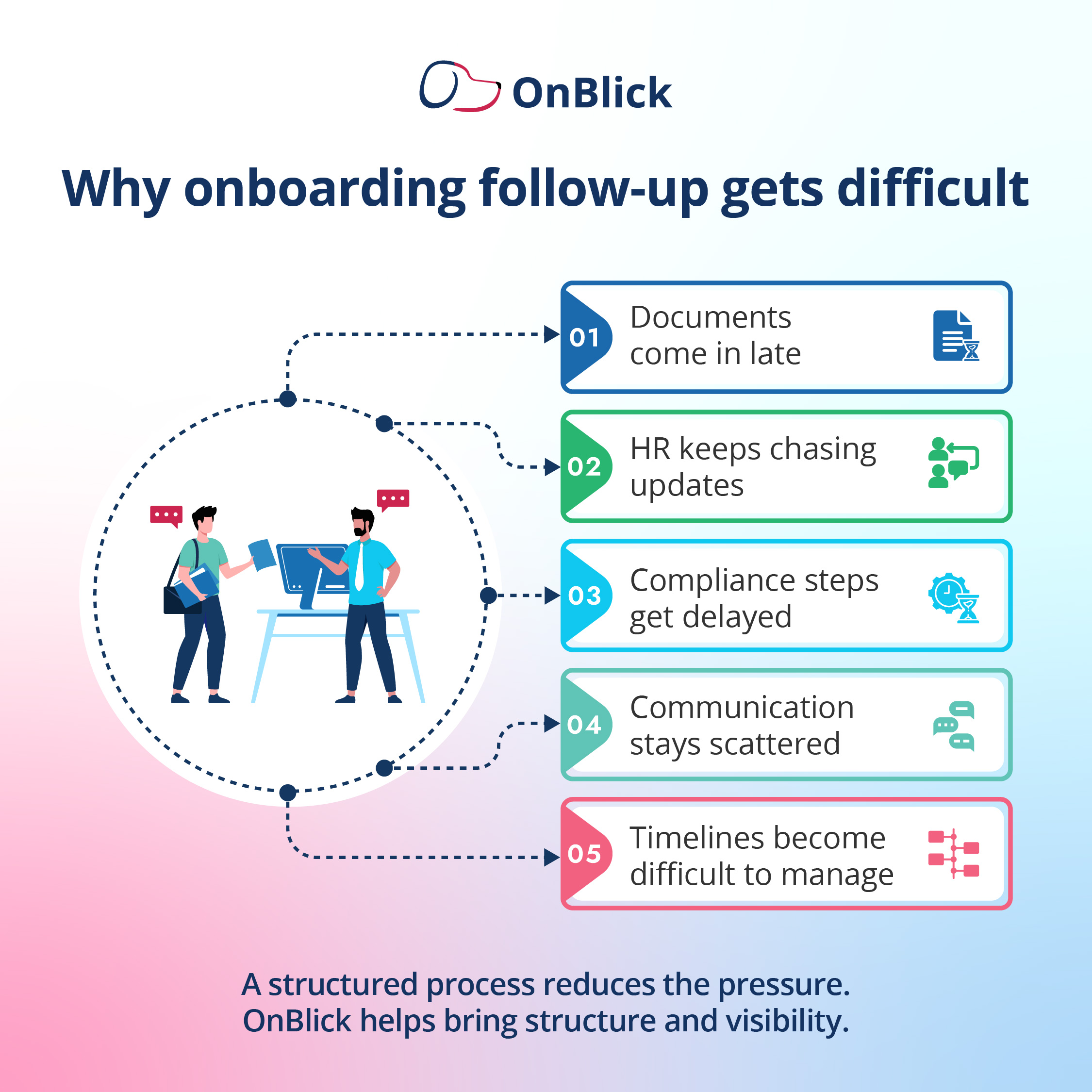
The hiring process doesn't end when a candidate accepts your offer. In many ways, that's when the most critical phase begins. How you handle onboarding directly impacts whether that new hire becomes a long term, engaged employee or someone who starts looking for their next opportunity before they've even settled in.
Eliminating Delays and Waiting Periods
Paperless onboarding dramatically improves the transition from candidate to employee. With paper based processes, new hires often wait days or even weeks for forms to arrive in the mail, complete them, mail them back, and have HR process everything.
Digital systems change this timeline completely:
- Offer letter sent, onboarding access provided immediately
- New hires start completing information right away
- Forms get reviewed and approved in real time
- The entire process compresses from weeks to days
- Enthusiasm stays high throughout the transition
Speed as a Competitive Advantage
Speed matters tremendously in today's competitive talent market. The faster you can move someone from accepted offer to productive team member, the less likely they are to get cold feet or receive a counter offer from their current employer.
Paperless onboarding compresses what used to take seven to ten days into a process that can be completed in one or two days.
Improving Accuracy and Data Quality
Accuracy improves substantially when you eliminate manual data entry. With paper forms, someone in HR must read handwriting, interpret unclear answers, and type everything into various systems.
Paperless onboarding software fixes these problems:
- Captures information directly from the source
- Validates data entry in real time
- Prevents submission of incomplete information
- Eliminates transcription errors
- Ensures consistency across all systems
Creating Better First Impressions
The new hire experience itself becomes significantly better. Modern employees expect digital interactions. When your onboarding process meets these expectations, it reinforces their decision to join your organization.
They see a company that values their time, embraces technology, and runs efficiently. This positive first impression sets the tone for their entire tenure with your company.
Strengthening Compliance Efforts
Compliance becomes much easier to maintain. Paperless onboarding software includes built in requirements for forms like I-9, W-4, and state tax documents. The system won't let new hires skip required fields or submit incomplete information.
This automatic enforcement of compliance rules protects your organization from costly violations while eliminating the burden on HR staff to manually review every form for completeness.
Maintaining Clear Communication
Communication stays clear and consistent throughout the process. Automated email reminders keep new hires on track without requiring HR staff to send individual follow up messages.
Status dashboards show at a glance who has completed what, making it easy to identify and address any bottlenecks. Everyone stays informed without the confusion that comes from managing onboarding through scattered email threads.

Benefits of Using Paperless Onboarding Software for New Employees
When we talk to HR teams about what is paperless onboarding bringing to their organizations, the benefits extend far beyond just going green, though environmental impact certainly matters. Let's explore the real, tangible advantages that paperless onboarding software delivers.
Massive Time Savings for HR Teams
Time savings represent the most immediate and obvious benefit. HR professionals report saving 10 to 15 hours per week once they implement paperless onboarding. That's time previously spent on:
- Printing documents and organizing packets
- Following up on missing forms via phone and email
- Manually entering data into multiple systems
- Filing everything appropriately in physical cabinets
- Searching for documents when needed
With paperless onboarding software, these tasks happen automatically in the background while your team focuses on strategic initiatives that actually develop your people and strengthen your culture.
Significant Cost Reductions
Cost reductions add up faster than most organizations expect. Beyond the obvious savings on paper, printing, and physical storage, consider the hidden costs that disappear:
- No overnight shipping documents to remote employees
- No purchasing filing cabinets and office space for storage
- No paying for off site document storage services
- No shredding services for old documents
- No replacing lost or damaged paperwork
Many organizations save thousands of dollars annually just on these direct costs.
Improved New Hire Satisfaction
New hire satisfaction improves dramatically with paperless onboarding. Employees appreciate:
- Convenience of completing everything on their schedule
- Ability to use any device including smartphones
- Clear progress indicators showing what's done and pending
- Professional, modern experience from day one
- No need to print, scan, or mail anything
The professional, modern experience tells them they've joined an organization that respects their time and operates efficiently.
Dramatic Error Reduction
Error reduction protects your organization from compliance issues and operational headaches. Paperless onboarding software includes validation rules that prevent common mistakes:
- Required fields can't be skipped or left blank
- Dates must follow the correct format
- Signatures must be captured before submission
- Social Security numbers get verified against patterns
- Email addresses must be valid
- Phone numbers must have correct digit counts
These automatic checks catch errors before they become audit findings or payroll problems.
Seamless Remote Hiring
Remote hiring becomes infinitely easier with paperless onboarding. The rise of distributed teams and work from home arrangements means many organizations now hire employees they may never meet in person. Paperless onboarding software handles this seamlessly with:
- Remote I-9 verification capabilities
- Electronic signatures from any location
- Digital document uploads via phone camera
- Video verification for identity documents
- Cloud based access from anywhere
Geography no longer limits your talent pool or complicates your onboarding process.
Enhanced Data Security
Data security actually improves compared to paper documents. Physical files can be lost, stolen, or damaged. They sit in filing cabinets that may not be as secure as we'd like to believe.
Paperless onboarding software provides:
- Encryption for all data in transit and at rest
- Detailed access logs showing who viewed what
- Role based permissions controlling document access
- Secure cloud storage with redundant backups
- Compliance with data protection regulations
- Instant recovery in case of disasters
You know exactly who viewed what document and when. In case of an audit, you can instantly produce any required documentation without digging through file rooms.
Unlimited Scalability
Scalability becomes possible in ways that paper processes simply cannot support. Whether you're onboarding five people or fifty people in a month, paperless onboarding software handles the load without requiring additional HR headcount.
The system doesn't care if you're processing documents for one new hire or one hundred. This flexibility helps organizations grow without proportionally growing their administrative burden.
Valuable Analytics and Insights
Analytics and insights help you continuously improve your process. Paperless onboarding software tracks metrics like:
- Completion rates across different departments
- Average time to complete onboarding
- Common points where new hires get stuck
- Overall process efficiency improvements
- Compliance status across all employees
This data helps you identify bottlenecks, streamline steps, and create an increasingly smooth experience over time. With paper, you'd never know if your process was getting better or worse.
Essential Features to Look For in Paperless Onboarding Software
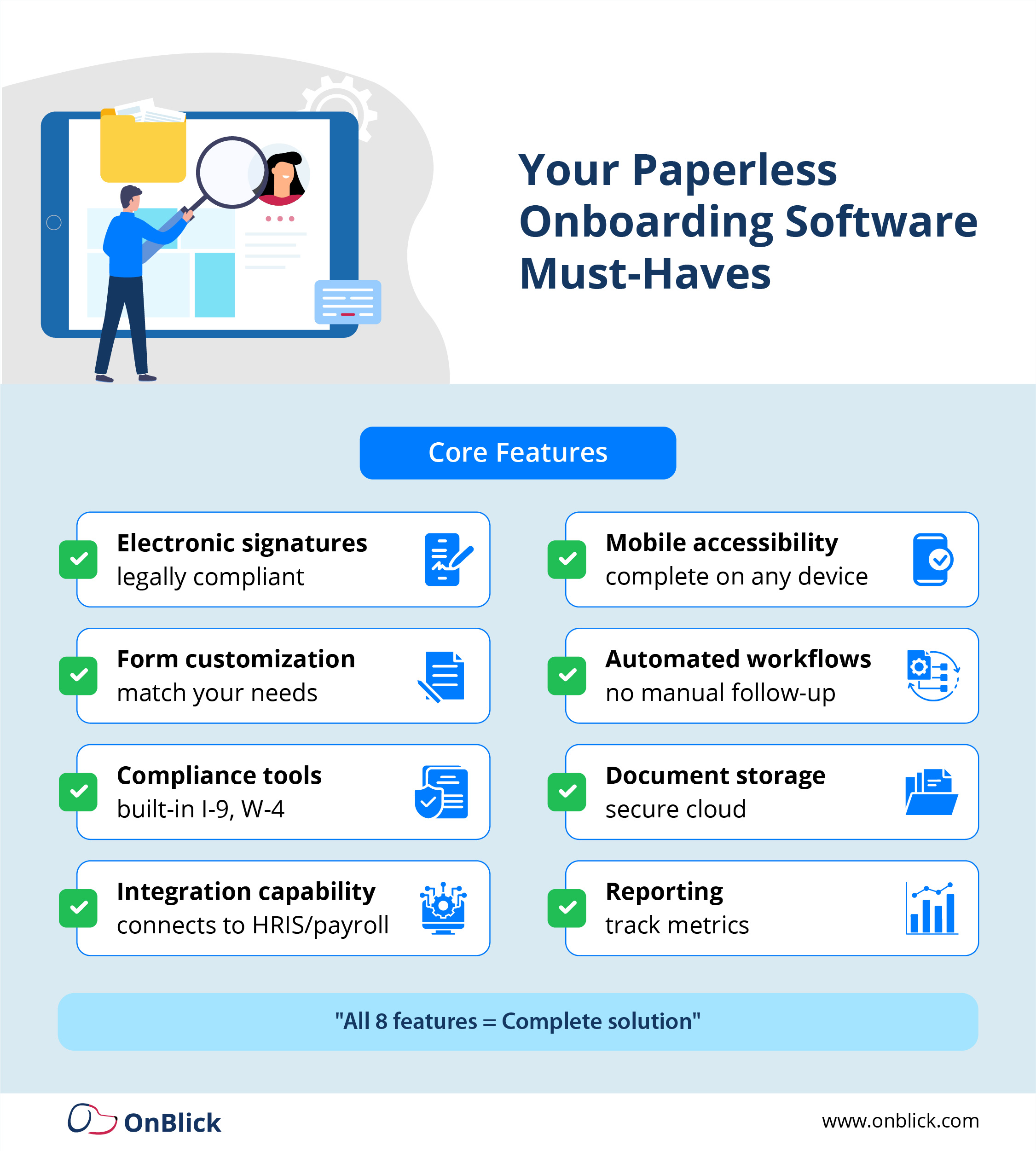
Not all paperless onboarding solutions offer the same capabilities or deliver equal value. When evaluating what is paperless onboarding software that will truly transform your process, focus on these essential features that separate powerful platforms from basic digital form builders.
Electronic Signature Capability
Electronic signature capability stands as an absolute requirement. Your paperless onboarding software must provide legally compliant electronic signatures that meet federal and state requirements.
Look for solutions that offer:
- Legally binding e-signatures meeting ESIGN Act requirements
- Detailed audit trails showing signature details
- Multi-party signature workflows for approvals
- Mobile friendly signature capture
- Time stamped signature records
- IP address and device tracking
The signature process should be simple enough that new hires can complete it on any device without confusion.
Form Customization and Templates
Form customization and templates ensure your onboarding matches your organization's specific needs. Every company has unique requirements beyond the standard federal forms.
Your paperless onboarding software should let you:
- Create unlimited custom forms
- Add your company branding and logos
- Build templates for specific departments or roles
- Include organization specific policies
- Modify existing form templates
- Create different workflows for different job types
The ability to create different onboarding workflows for different departments or job types adds tremendous flexibility.
Document Management and Storage
Document management and storage provide the foundation for staying organized and audit ready. Look for systems that:
- Automatically categorize and file documents
- Make everything searchable by multiple criteria
- Track document versions and update history
- Maintain permanent, tamper proof records
- Provide cloud based storage with backups
- Allow bulk document uploads
- Support various file formats
Cloud based storage with proper backups ensures you never lose critical employee information.
Automated Workflows and Task Management
Automated workflows and task management keep the onboarding process moving forward without constant manual intervention.
Your paperless onboarding software should automatically:
- Assign tasks to the right people based on role
- Send reminder emails when deadlines approach
- Escalate overdue items to managers
- Update everyone on progress in real time
- Route documents for sequential approvals
- Trigger next steps when tasks complete
This automation eliminates the need for HR staff to constantly monitor and nudge people along.
Compliance Tools and Checklists
Compliance tools and checklists protect your organization from violations. The best paperless onboarding software includes:
- Built in Form I-9 verification processes
- W-4 and state tax form templates
- Industry specific compliance requirements
- Required field enforcement
- Expiration date tracking and alerts
- Audit trail documentation
- Compliance reporting capabilities
The system should make it impossible to skip required fields or submit incomplete information. Automatic alerts when work authorizations or certifications are expiring help you stay ahead of compliance deadlines.
Integration Capabilities
Integration capabilities connect your onboarding to other HR systems. Your paperless onboarding software shouldn't exist in isolation.
It needs to share data seamlessly with:
- HRIS and human capital management systems
- Payroll processing platforms
- Time and attendance tracking tools
- Benefits administration systems
- Applicant tracking systems
- Background check providers
Proper integration eliminates duplicate data entry and ensures information flows correctly throughout your HR ecosystem.
Mobile Accessibility
Mobile accessibility meets the reality of how people work today. New hires should be able to complete their entire onboarding from a smartphone or tablet.
This means:
- Mobile optimized forms that work on small screens
- Phone camera integration for document photos
- Mobile friendly signature capture
- Responsive design on any screen size
- Push notifications for pending tasks
- Offline capability with sync when connected
Reporting and Analytics
Reporting and analytics help you measure success and identify improvements.
Look for paperless onboarding software that provides:
- Real time dashboards showing onboarding status
- Completion rate reports by department or location
- Time to complete metrics and trends
- Bottleneck identification tools
- Compliance status reports
- Custom report building capabilities
Security and Access Controls
Security and access controls protect sensitive employee information.
Your paperless onboarding software must include:
- Encryption for data in transit and at rest
- Role based access controls
- Detailed audit logs tracking all access
- Multi-factor authentication options
- GDPR and privacy regulation compliance
- SOC 2 or similar security certifications
- Regular security audits and updates
Paperless Onboarding Solutions Worth Considering
Understanding what is paperless onboarding in theory only helps if you know how to find the right solution for your organization. The market offers numerous options, each with different strengths and ideal use cases. Let's explore some approaches to finding paperless onboarding software that fits your specific needs.
Define Your Requirements First
When evaluating paperless onboarding solutions, start by clearly defining your requirements.
Consider these key factors:
- Organization size and expected hiring volume
- Specific compliance needs based on industry
- Geographic locations and multi-state requirements
- Technical capabilities and IT support available
- Budget constraints for initial and ongoing costs
- Integration needs with existing systems
Match Solutions to Your Pain Points
Look for solutions that specifically address your pain points:
- If compliance is your biggest concern: Prioritize platforms with robust I-9 management and automated compliance checking
- If you hire remotely: Emphasize solutions with excellent remote verification and state specific form support
- If you onboard high volumes: Focus on platforms designed for scale with bulk processing capabilities
- If you have limited IT resources: Choose user friendly, self service platforms with excellent support
Consider Industry Specific Needs
Industry specific needs often require specialized solutions:
- Healthcare organizations: Need HIPAA compliance and credentialing workflows
- Financial services: Require background check integration and regulatory reporting
- Government contractors: Need security clearance tracking
- Staffing agencies: Need multi-client workflow management
Make sure any paperless onboarding software you consider understands and addresses your industry's unique requirements.
Evaluate Integration Requirements
Integration requirements should heavily influence your decision:
- Take inventory of your current HR technology stack
- Determine which systems must exchange data
- Verify that solutions offer pre built integrations
- Confirm API availability for custom integrations
- Test integration functionality during demos
Poor integration leads to duplicate data entry and process breakdowns that undermine the benefits of going paperless.
Test User Experience Thoroughly
User experience matters tremendously for both HR staff and new hires:
- Request interactive demos, not just presentations
- Have team members test the platform
- Get feedback from people with different tech skills
- Ask new hires to try the candidate experience
- Evaluate mobile experience on actual devices
A powerful platform that's too complicated to use delivers no value.
How OnBlick Enables Seamless Paperless Onboarding
When it comes to paperless onboarding software designed with compliance at its core, OnBlick delivers a comprehensive solution that eliminates administrative headaches while keeping you audit ready.
OnBlick handles the complete onboarding workflow with features specifically built for modern HR teams:
- Bulk onboarding capabilities that let you process multiple new hires simultaneously
- Electronic I-9 completion with remote verification for distributed teams
- Employee self-service portal where new hires complete everything independently
- Automatic work authorization tracking with expiration alerts
- Digital signatures built in for all documents
- Complete audit trails that prove compliance during inspections
The platform integrates E-Verify processing, timesheet management, and leave tracking into one unified system. Instead of juggling multiple tools, everything lives in one place with a user friendly interface that requires minimal training.
Organizations using OnBlick report saving significant time on daily operations while improving compliance and creating better experiences for new hires. The automation handles repetitive tasks, freeing your HR team to focus on strategic initiatives that actually develop your people.

Making the Transition to Paperless Onboarding
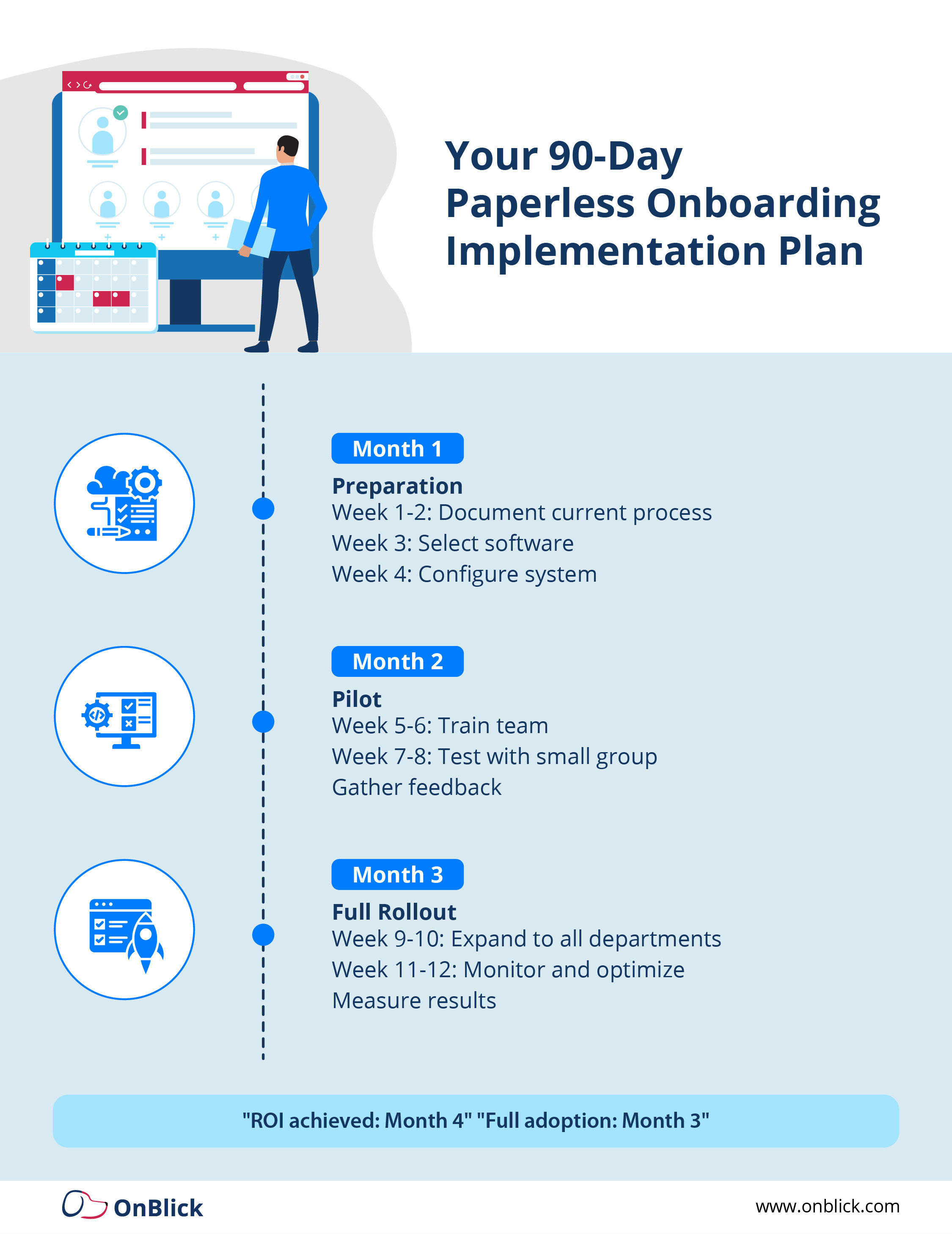
Successfully transitioning to paperless onboarding doesn't have to be complicated. Here's a straightforward approach that works.
- Start with Documentation
Map your current onboarding process before changing anything. List every form, signature, and step you currently use. This baseline helps you understand what needs to migrate and reveals inefficiencies you can eliminate.
- Choose a Pilot Group
Don't switch everything overnight. Select one department or location to test your new system. Work out any issues in this controlled environment before expanding company wide.
- Train Your Team
Give your HR staff and hiring managers hands-on training with the new system. Create simple reference guides they can use when questions come up. Schedule check-ins during the first month to address concerns.
- Communicate with New Hires
Let new employees know what to expect from the digital process. Include brief instructions in your offer letter so they're prepared when the onboarding invitation arrives.
- Measure Your Results
Track metrics like completion time, error rates, and employee satisfaction. Compare these to your baseline to prove the value of going paperless.
Conclusion
The shift to paperless onboarding isn't just about saving trees or reducing filing cabinet clutter. It's about giving your HR team their time back, creating better first impressions for new hires, and staying compliant without the constant stress of wondering if you missed something important.
Every day spent managing paper forms is a day your team could be doing more meaningful work. The technology is ready, proven, and easier to implement than you might think. Solutions like OnBlick handle the complexity while keeping the user experience simple for both your HR staff and new employees.
The real question isn't whether paperless onboarding makes sense. It's whether you're ready to stop wasting time on administrative tasks and start focusing on what really matters: building a great team and culture.
Start small, measure your results, and watch the benefits compound. Your future self will thank you for making the switch today.
Frequently Asked Questions
What exactly is paperless onboarding?
Paperless onboarding is the process of bringing new employees into your organization using entirely digital methods instead of traditional paper documents. It involves collecting all employee information, completing required forms, capturing signatures, and storing documentation electronically through specialized software platforms.
This eliminates the need for printing, physical signatures, mailing, scanning, and filing paper documents.
How does paperless onboarding improve compliance?
Paperless onboarding software improves compliance by building requirements directly into the system. The software won't allow incomplete forms to be submitted, automatically validates information against required formats, tracks expiration dates and sends renewal reminders, maintains detailed audit trails of every action, stores documents securely with controlled access, and provides instant access to any documentation during audits.
This systematic approach eliminates the human errors that commonly occur with manual paper processes.
Can employees complete paperless onboarding from their phones?
Yes, modern paperless onboarding software is designed to work seamlessly on smartphones and tablets. Employees can complete forms, upload photos of identification documents using their phone camera, sign documents with their finger or stylus, and submit everything without ever touching a computer.
This mobile capability dramatically improves completion rates and employee satisfaction.
Is paperless onboarding secure?
Paperless onboarding is actually more secure than traditional paper processes. Digital systems use encryption to protect data in transit and at rest, maintain detailed access logs showing who viewed what documents and when, implement role based permissions so only authorized people access sensitive information, store everything in secure cloud environments with redundant backups, and comply with data protection regulations like GDPR.
Physical paper documents can be lost, stolen, damaged, or accessed by anyone with access to the filing cabinet.
How long does it take to implement paperless onboarding?
Most organizations can implement basic paperless onboarding in two to four weeks. This includes selecting software, configuring forms and workflows, training staff, and running pilot tests. Full adoption across all departments typically takes one to three months. The key is starting with a focused pilot program and expanding gradually based on results.